
It is now possible to have multiple administrators for your school app portal. Each one will have their own unique login and password.
Schools can have:
- One main administrator (who manages the school account)*
- Additional administrators (full permissions)
- Content Editors (specified permissions only)
* As the main administrator, if you have previously shared your login with other staff members, we now recommend changing your details and keeping your password private. This helps us all with GDPR compliance.
What's a Content Editor?
A Content Editor is created by a School Administrator. They specify which functions of the app the Editor has permission to edit or add content to, by checking against the specified function.
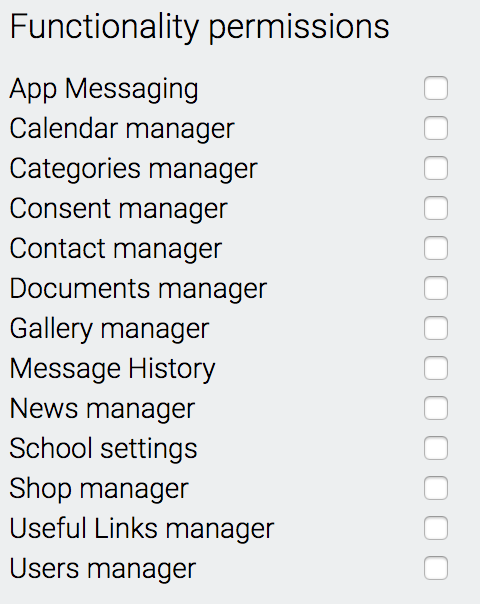
For example you may want to give mySchoolApp access to the PTA (or School Council), but only enable them to add news, add calendar events and maybe send App messages. When they login they will only see those options in the portal.
To add a new Admin or Content Editor
- Go to Account settings
- From the Account settings sub menu, select Admins
- Click CREATE NEW ADMIN
- Enter their name and email address
- Select Type from the drop down menu
- Leave status as Enabled
- Click SAVE
They will receive an email from us inviting them to become a mySchoolApp editor.
Functionality and access privileges can be changed by an Admin at any time. And if they leave the school they can be instantly deleted from the system.
The activity of all Admins, Content Editors (and mySchoolApp support) on the administration portal is logged by user ID in Account settings > Reports
A note about Passwords
A change has been made to make it easier for admins that are also app users. Any administrator or Content editor will be automatically added as an app user, if they're not already on the system. This is to simplify the management of videos on the app. The same email & password can be used for both the admin portal and the app.
If a simple password has previously been set for the portal, an admin may be asked to change to the stricter criteria* for app passwords when Signing in on the app. This new password can now also be used for the admin portal login.
* Min 6 characters which must include at least 1 capital letter and 1 numeral
Comments
0 comments
Please sign in to leave a comment.